I am not a coder and I am not a programmer. I have experience with websites and software and things like that, but just in testing them.
Three and a half months in, roughly half my working time now involves this. In that time I have rebuilt MedCourse, the medical education platform I founded in 2021, built this website, built a clinic site for a client, built our CRM, built an SEO dashboard, and built the free audit tool we give away. Over a thousand commits, which I love telling my dev friends, as it makes it clear that I have no idea what I am doing.
When I put the workshop together I asked Claude to look through my whole codebase and decide what I should talk about. I ignored most of what it came back with. That is roughly the relationship.
This is the session written up, with the healthcare parts I did not have time for on the night. There is a lot that you can do with this and you do not have to know what any of it means.
Key takeaways
- What it produces is just files in a folder. Getting those files onto the internet is a separate step, and an easy one.
- Start with whatever is costing you time, money, or pain. MedCourse now runs on about £80 a month against roughly £400 before.
- Plan first, and make it ask you questions until you get annoyed.
- AI is very trusting, so nothing clinical goes on the page unless it came from you or a source you could show a patient.
- The failures that cost me most showed no error at all. One contact form accepted every enquiry and binned it for two months.
- Decide who edits the site after you build it, before you build it.
Three ways to use Claude, and you might only need the first
People use these names interchangeably and they are genuinely different products.
Claude chat. You say a thing, it does a thing, you say a thing, it does a thing. It has plenty of tools now and it can produce files you download. For most people, most of the time, this is enough. I ran a whole workshop about Claude Code and I still think that.
Cowork. You give it a folder on your machine and it reads and edits the files in it. The point is context that accumulates. For a client I spend the first session dumping everything in: their website copy, call transcripts, LinkedIn posts, clinical facts, how they like to talk. Then I ask for two files out of it, a source of truth about the company and a brand voice document. From then on, every session in that folder already knows who the client is, so when I sit down to write a service page I am not re-explaining the business, I am just writing the page.
Claude Code. Same idea, aimed at building things. Rather than saying a thing and it doing a thing, you give it some instructions, you talk back and forth, it makes a plan, and then it goes and acts on that plan.
If you are trying to write better content or run better workflows rather than build software, stop at Cowork. You do not need the rest of this.
What it is actually doing is writing files in a folder
This is the bit that demystified it for me, so I want to be blunt about it.
The whole of the MedCourse website is just a series of files. Some code files, some text files, some scripts, some images I dropped in. Nothing more mysterious than that. All it is doing is writing files on your PC within a folder, and then you do things to connect it to the internet and to somewhere that can host those files, and then it becomes a thing.
Which means two things. First, it is much less intimidating than it sounds. Second, when something goes wrong, the problem is always in a file somewhere, and you can ask Claude to go and look at it.
The beauty of using AI is that you can talk to it and it will tell you some things that you have no idea what any of them mean, and you say I have no idea what this means, and it explains it to you. It can explain itself to you as you work through it.
I once said in a LinkedIn post that MedCourse uses something called Astro, and it turns out that it does not use something called Astro, but I had to ask Claude because I do not know anything. You can do a lot without knowing very much on this.
Setting it up takes about an hour, and the first hour is the annoying one
- Download the Claude desktop app. Technically you can run Claude Code from a terminal, and developers do. If you are not a coder, use the desktop app. It shows you your projects, your sessions, and the changes it is making.
- Get on a paid plan. Start on Pro and only move up if you keep running out of capacity with real work waiting.
- Install Git. Git is just a way of sorting out your folders and your files, and making sure you have got the right branches and work trees and all these things that coding needs and organising. It runs in the background and you will barely touch it. It is also the reason any change can be undone.
- Make one projects folder, and keep Claude inside it.
- Run the setup repo. My rules, agents, and configuration are public at github.com/wcseo-uk/claude-config. Ask Claude to download it and walk you through the setup step by step. It will explain itself as it goes.
On point four, learn from my mistake. As soon as you give it access to your full PC it can delete things by accident, move things around, and change files in your Downloads. At one point it was quietly reorganising my Downloads folder and editing things I did not want it to edit. Keep it in the projects folder and it will keep in its place and you do not have to worry about it.
The setup repo also turns on one thing worth knowing about. Instead of directly editing your code base it creates a copy, edits in that copied folder, then looks between the copy and the original and asks whether these are all right to merge. A bad session is much less likely to wreck anything.
The CLAUDE.md file is what stops it guessing
The single most useful thing in the setup. CLAUDE.md is a plain text file of context and instructions that Claude reads automatically. There are two levels.
The global one is your standing instructions for how you work. Mine says things like plan before acting, never guess, stay safe, do not use destructive commands. It also says I do not particularly want to develop any servers on my Mac, I just want it to go to a server that I connect it to.
The per-project one sits in each project folder. What the project is, the tech it uses, what happens when we develop together, the order I want things done in, reference documents, and conventions. It is just context.
I have not written any of this from scratch and you should not either. All I did was say I do not know what I am doing, paste in something I found online, and ask whether it was a good idea or not. Then Claude and I had a conversation and edited it together.
A good CLAUDE.md is the difference between an assistant that guesses and one that checks. Most of the frustration people report in their first week comes from not having one.
Connectors and MCPs let it talk to your other software
Two words you will keep hearing, and they are simpler than they sound.
An API is the go-between that lets one piece of software talk to another. If a service has built one, other software can connect to it and do things without a human clicking buttons.
An MCP is a layer on top of that. It hands Claude the full menu of what a service's API can do. It is giving a menu, it is giving all the options, and Claude picks the right one. When somebody in the session asked whether an MCP is basically a menu of APIs, that is exactly it. I do not know exactly how it works underneath, and it is a real buzzword, but that is the useful version.
The practical upshot: Supabase is the database behind my ad landing pages. Without an MCP I would log in, open the editor, click through, and make the change myself. With it connected I ask Claude and it talks to Supabase directly and it is done.
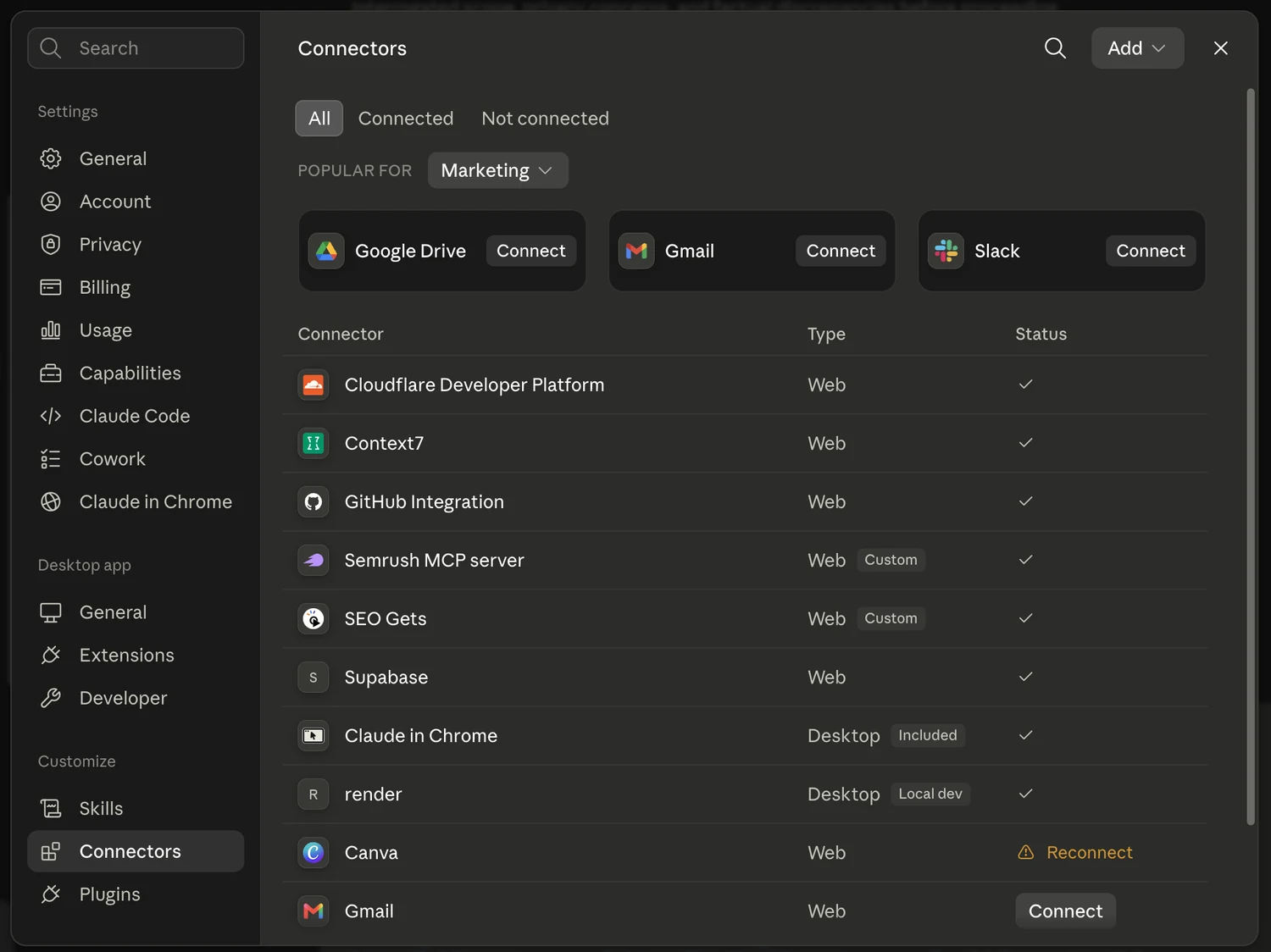
Ones worth having: Context7 for current documentation, because Claude's training data has a cutoff and without it Claude will confidently describe a settings page that changed six months ago. Your analytics tools, which for me are SEO Gets and Semrush, so I can ask a plain question in normal chat and it goes and pulls the real numbers. Cloudflare, Supabase, and GitHub for anything you are hosting or storing. They live under Settings, then Connectors, and if a service is not listed, ask Claude how to connect to it.
One warning that matters more in healthcare than in most industries. If you ask it about something that changed recently, it might well try to tell you from its knowledge from August 2025 or something. If you add "search online" it will actually go and look for the latest guidance. But sometimes it gets tricked by people who have made horrible SEO blogs to promote their own stuff, and it will try to give you an answer that someone else has tried to make it have. I run an SEO agency, so I am telling you my own industry has poisoned some of the answers you are going to get. Cross-check anything that sounds too convenient.
How I actually work: plan first, then let it run
There are four modes and the one you pick matters more than people expect. I do not actually know what manual mode is. Accept edits asks permission for each file it wants to read or change.
The one that matters is plan mode, and I always start there. You are saying to Claude, I want to make this thing, how should we do it, let us plan, ask me questions. Eventually it writes a plan, it presents you the plan, it asks whether this is good to go, and you tweak it. It is only once you are done with that that it will start actually editing code.
Then there is auto, where it just goes, and that is what I stick everything on. So my routine is: plan mode, argue about the plan, reject the first version, get it revised, then switch to auto and let it work. I read through most of the plan, or I skim it these days.
Before any of that I brainstorm, and mostly I brainstorm on the go. I will open a thread with, I have got this idea for this thing, how might I go about doing that, what sort of avenues do I have. Then I dump as much context in as possible: the pages I want, the colours I like, a ton of images, a couple of Word docs with content in, screenshots of sites I like, and screenshots of what I have now and what I hate about it.
Then, at the end of all that, the prompt I use is: ask me so many questions I get annoyed. It will keep asking until it is really clear. Skip it and it builds something confidently wrong, and you will look at it and think that is not at all what I wanted.
One more habit worth stealing. When you get a plan, paste it into a different AI and ask where the mistakes are, then bring the critique back. A long session gets tunnel vision. If you have mentioned one type of server ten times in the chat already, it will get really hyper focused on that type of server and it will not consider anything else. A different chat has not heard any of that, so you play them off each other, come to some sort of conclusion, and make a plan.
On models, Sonnet is the workhorse and Opus is the strong one, and I run almost everything on Opus. Coding quality took a real step up with Opus 4.6 in February, which is roughly when this stopped feeling like a novelty and started replacing actual work.
Design it before you build it
Genuinely my favourite part, and it is useful even if you never build a website.
Claude Code cannot see what it is making. Claude Design can. It takes a screenshot of its own work, looks at it, and notices that two things overlap or that the spacing is wrong. That removes most of the frustration.
The important habit is asking for options. Say make three versions and I will choose the best one, because otherwise it makes stuff that is all very samey. Then you can say I like this from A, and I like that from B, and I like this from C, and I hate this. You are just giving feedback.

After that you comment straight onto the design. That image should be below the hero. Make it fifty-fifty. This font is wrong. Make it more subtle. I just keep messing around until it is in the right place.
My instructions are not sophisticated. For the MedCourse login page I asked for a cool moving blue background, lava lamp style, moving around. That was it. Very clear instructions that I give.
When you are happy, export the handoff file and give it to Claude Code to build for real. It will spot differences between the mockup and the live site and ask which way to go.
One warning from doing this on our own About page. When the handoff got hand-translated into a different styling system rather than generated from the original, real design detail went missing quietly: white numerals on the facts row, two-column philosophy rows, and side-by-side roster cards. Nobody noticed for weeks. If you get a design you like, keep the original file and generate from it, rather than letting it be rebuilt from memory.
You can also send the result straight to Canva through its MCP and finish it there. That is how the workshop poster was made, and I am not very good at design, so it does a decent job.
Getting the files onto the internet
You now have a folder of files, which is useless to everyone but you. The first time I got here I simply asked what do I do next, then pushed back with is that really the best option, are you sure, and we worked it out. That is still the honest process.
- GitHub. Just a way to put all of those files that you have online. It mirrors what is on your computer, and updating it can automatically trigger an update to your live site.
- A host. Cloudflare is free and good and is what runs this site. Railway is excellent if you need a database attached, which is what my SEO dashboard uses.
- A domain. Point it at the host. Claude will tell you exactly which DNS settings to change.
This site is a bunch of files I put together. Those files were on my Mac, I push them out to GitHub, and GitHub pushes them through a thing called a worker, and the worker serves the site. It lives at a Cloudflare address whose super long name is not very good, and then a rule sends whitecoatseo.com there.
Most of the websites that I make use a framework called Astro. Astro is just the way it builds a static site, and then I hook it up to Cloudflare. Static matters more than it sounds: it means the words are already in the file that gets sent, rather than being assembled in the visitor's browser afterwards. Google can handle the second sort, but it takes another pass at it, and my understanding is that a lot of AI crawlers do not run that code at all, so all they get is whatever was in the file. If you want to check your own site, view the page source and search for a sentence you know is on the page. If it is not in there, that is what ChatGPT is working from too.
You will not get this right first time. Argue with Claude for a while, come to a conclusion, and you will have something.
Choosing what to build: time, money, or pain
Somebody asked how I decide, which is the right question, because the failure mode is wanting to do all of it at once and finishing none of it.
My test is: what can I not do right now that I would like to be able to do? Then, how much time or money or pain am I feeling, and can this take it away? Time, money, pain. That is the whole filter. And then I got carried away and did a load of other things because it was fun, so honestly it is money, time, or fun.
The worked example is MedCourse. I built it in WordPress in 2021 and it had about twenty-five plugins which constantly needed updating, and every time I updated one it broke the whole site. Adding courses meant emailing a list to a virtual assistant, waiting for a document back, finding half of it wrong, and editing it myself. So I neglected it for years.
The rebuild fixed the design and the technical debt. But the thing I actually cared about was this: to add a course, I paste a URL. Cloudflare's browser rendering API grabs the page and turns it into text, the Claude API reads it and formats it, and I approve it. I can do that twenty at a time, or point it at seventy-five providers and let it check three hundred courses for new dates.

Somebody in the session asked whether this is actually generating revenue, and the honest answer is that it has never really built revenue for me. It is building more than it used to.
| MedCourse, per month | Before | After |
|---|---|---|
| Revenue | ~£450 | ~£500 |
| Running costs | ~£400 | ~£80 |
| Roughly left over | ~£50 | ~£420 |
On top of that it saves me about £150 a month in software charges, about the same in virtual assistant costs, and I probably save about two or three hours a week. The revenue barely moved. Everything else did.
A few others, and what each replaced. The CRM replaced a project management tool that is really complicated and costs quite a lot. The certificate generator replaced making them one at a time in Canva, which was taking hours and hours. The free audit tool came out of us spending two or three hours going through a clinic's website with a checklist and a spreadsheet, until I took all of that and gave it to Claude and asked how can I automate this. That one was a cool tool that I thought could get me some new clients through the door, so I will name my own incentive there.
And the counterweight, because I have made this mistake myself. I would not recommend doing it all the time. It can take forever to make something, and rather than spending twenty hours making something that is available for $20 a month, you might as well just use that. It is fun, and it is often a bad trade.
AI is very trusting, and on a clinical site that matters
Here is the line I would put above everything else if you are building anything a patient will read.
AI's very, very trusting. It will believe anything that you tell it.
It will also fill a gap rather than leave one. On a clinic website that means it will write a confident sentence about a procedure, a recovery time, a success rate, or a qualification that nobody ever gave it. The sentence will look exactly like the ones around it.
So the rule on everything we build is that nothing clinical is invented. Facts come from the clinician, or from a source you could put in front of a patient, and anything missing gets flagged as missing rather than guessed. Decide which claims need sign-off before the page is written rather than after, because getting clinical information wrong is a complaint, a claim, or an embarrassment in front of your peers.
The version of this that actually bit us was data, not prose. I once wrote a blog post that did not do very well, a complete list of all the categories you can list your healthcare Google profile under. It was a big long list, and I thought, how can we make that better? Turning it into a searchable tool took about twenty minutes.
Getting the data right took a great deal longer. The list we started from was the American one, and it is wrong for UK clinics on 62 of the 279 categories. Physical therapist is Physiotherapist here. Podiatrist is Chiropodist. Drug store is Chemist. Family practice physician is GP. Every one of them looked completely fine until we checked it against the real source, which in the end was PlePer's UK and US exports joined on Google's own category IDs. A clinic listed under a category that does not exist in this country simply does not show up. If you want the practical version of that, we wrote up how to choose your categories separately.
Design tools do the same thing in a different costume. When Claude Design generates a mockup it fills the tables with realistic-looking sample records, and those records are invented. They are there to show you the layout. Check anything factual against the source before it goes anywhere near a live page.
The last one is simpler. Do not paste patient information into a chat to test a form. Use made-up data. And decide early where enquiries actually land, who reads that inbox, and how long anything sits in it.
The failures that cost me most showed no error at all
The stuff that has actually cost me did not look like anything was wrong. It all looked fine, so I carried on.
A contact form that binned every enquiry for two months. Both forms on this site posted to a third-party service using an access key that had been sitting in the code since early June, for an account that had never been registered. The service accepted every submission and sent the person to the thank-you page anyway. Nothing bounced, nothing errored, and there was nothing in any log to look at. From roughly 5 June to 4 August 2026 every enquiry was accepted, acknowledged to the person sending it, and thrown away. I had no reason to look, because the key looked completely real.
Eleven days of work that never went live. Two separate things failed at once. The repository's permissions changed, which cut the host's access to see new pushes, so no builds ran. Meanwhile, because the project had no locked list of dependency versions, one of the build tools quietly upgraded itself past what the site could work with. No builds ran, and none failed either. I kept committing into silence.
A secret in the wrong box. Cloudflare splits configuration into values read while the site is being built and values read when a visitor arrives. A secret in the wrong one is invisible to the running site with no warning anywhere. That cost an hour with everything on screen looking correctly set up.
A check that passed because it was reading nothing. I was testing live pages with a command that did not follow redirects, so it came back empty every time, and every check against it passed.
Structured data that was lying. Every article on this site told Google it had been modified on the day it was published, because the field was set to copy the publish date. It had been that way since the blog was built.
There is a version of this that is much less dramatic and much more common, and it is the same shape. On this site the code that reads page content returned nothing at all when it ran on Cloudflare, which silently blanked pages rather than erroring. The fix was to keep the marketing pages built in advance and leave only the admin behind the live server.
So when I want to know whether a form is delivering, I test it. I send one through and see whether it arrives. When I want to know whether a deploy has landed, I check for the changes on the live site, or I look at the deploy screen on whatever is hosting it. Neither is clever. Both are things you have to actually do, because Claude is good at building the thing and consistently optimistic that the thing is working.
Debugging has its own rhythm and it is not a pleasant one. I would go back and say this is broken, and it would still be broken, and I would say it is still broken, and I would go back and it is still broken. What eventually breaks the cycle is asking directly whether we can go into a debug mode or something, or whether there is a better way to do this. Then it says oh, I forgot I could do that, and finds it in one go. It can be really frustrating at times, but it can be pretty good at that.
Decide who edits the site after you have built it
This is the one I would warn a clinic about, because I got it wrong on my own site first.
When a site is just files, every change goes through you. If I want to change one word I have to go to Claude and say can you change this word, and then it has to push it out to GitHub, and then that has to push it out to the host. It takes a little while and it has been annoying. And that is just me editing my own website. If a practice manager needs to change your opening hours on a Friday afternoon, they cannot.
The fix is a CMS, a content management system, which is a proper admin screen where staff edit pages and posts in a form. Both MedCourse and this site have one. Ours is Keystatic, and it means the blog and most of the page copy are edited by people who never touch the code.
Sometimes the right answer is that it stays in WordPress. I am building a site for a client at the moment that is staying on WordPress because I think it still needs to be in WordPress for the client to edit it. So I mocked the whole thing up, specified the blocks I wanted, and handed it to actual developers who know things, and they built it.
There is a third option worth knowing about. You can run WordPress headless: keep WordPress at the back as the content management system, and have Claude build a completely new front end. The two still talk to each other and you can redesign freely without touching your content. There is an official WordPress MCP, though I would test it carefully before trusting it, and some plugins are building their own. I think you would lose all your hair at first and it would get a lot wrong, but I think you could do it, pretty easily in the end.
What it is good at, and what I would not do with it
I think it is really good for mocking things up. I think it is really good for making internal tools. I think it is really good for making websites that do not matter too much in terms of functionality. I think it is okay at making stuff that does matter, but I am constantly afraid that it is going to delete itself, so I ask it a million questions on how to not do that.
What I would not do is sell software you cannot maintain. I do not think it is good, if you do not know how to code, at making something that you then sell as a software subscription, because there are a ton of people trying to make a load of money off the back of that and creating something that is buggy, does not really work, and is not really adding to the world.
And a warning I mean sincerely. If you get into it you are going to end up staying awake until 2am, because it is just too fun to use, and you will be there on a weekend working and wondering how on earth you use all of the tokens you have. It is a bit overwhelming. Budget for that.
Three and a half months ago I did not know what Railway was, and I did not know what an MCP was, and I did not know what any of these coding terms were. It can teach you itself, if you ask it politely.
Links and resources
Start here
- github.com/wcseo-uk/claude-config, my setup repo. Install Git, then ask Claude to download it and walk you through it.
- docs.claude.com/en/docs/claude-code, the official documentation.
Things referenced above
- medcourse.co.uk, the rebuild and the bulk ingest example.
- audit.whitecoatseo.com, the free audit tool.
- The GBP healthcare category browser, 279 categories with the UK and US naming.
Tools
- git-scm.com, install this before anything else.
- astro.build, the framework for fast static sites.
- cloudflare.com, free hosting, DNS, and the browser rendering API.
- railway.app, hosting with a database attached.
- supabase.com, a database with a good MCP.
- context7.com, keeps Claude current on tool documentation.
- keystatic.com, the CMS behind this site.
If you get stuck on setup, send me a message. The first hour is the only genuinely annoying part, and it is much faster with someone to ask.
This is the write-up of a free session I ran on 6 August 2026. Two corrections to what I said on the night: the step change in coding quality came with Opus 4.6 in February 2026, not the version I gave, and on Fable and Mythos, those are two builds of the same model, one with safeguards and one without, with access governed by a partner programme rather than by nationality.

Former NHS doctor. Writes about durable, clinically-sound search for specialist clinics. Diagnosis before prescription, every time.